


Ready to kick start an OTT streaming platform with us?

 LIMITED OFFER: 1-year free setup for FAST Channels!

English
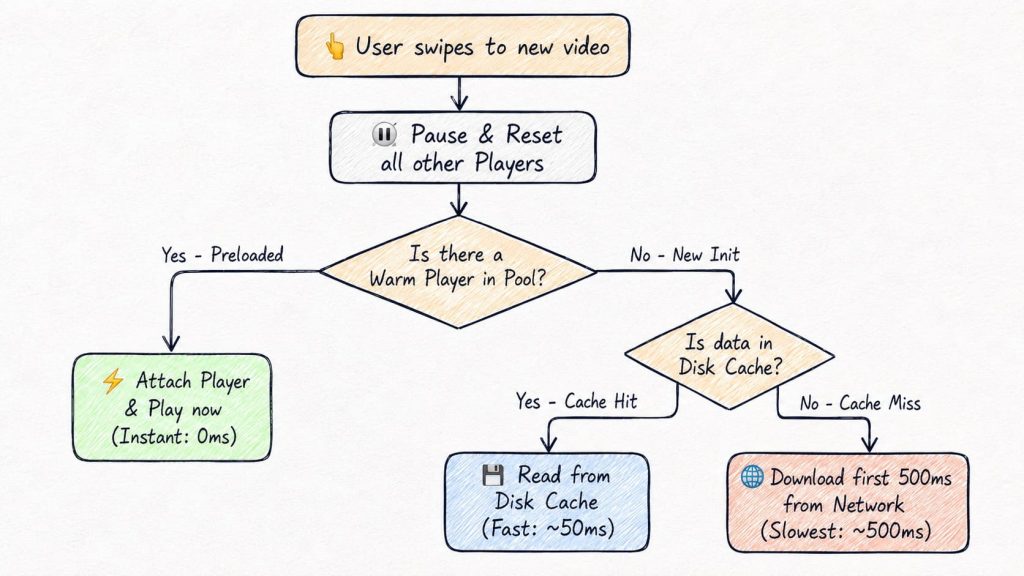
Short-video playback in OTT optimization is what makes a swipe-to-next feed feel instant, even though every clip still has to travel over a real network connection. OTTclouds builds this into the Android SDK by front-loading the expensive parts of playback, including player setup, network fetch, and buffering, before the user ever swipes, so the video is already sitting in memory or on disk by the time they act.
On its own, no single technique gets you there. It’s four techniques working together: a warm player pool, predictive preloading, shared disk caching, and an aggressive buffer threshold. Together, they pull total perceived latency down from 2–5 seconds to something close to zero.
Key takeaway: “Instant” playback isn’t a codec trick or a faster CDN. It’s scheduling. OTTclouds does the expensive work before the user asks for it, so the app only has to do cheap work at the moment of the swipe.
At OTTclouds, we build white-label OTT streaming platforms that power video experiences for brands worldwide. Short-form video is one of the fastest-growing content formats in streaming, and users expect it to feel instant. This is how our Android team made that happen.
Note: the techniques in this article are specific to the Android platform and its media stack.
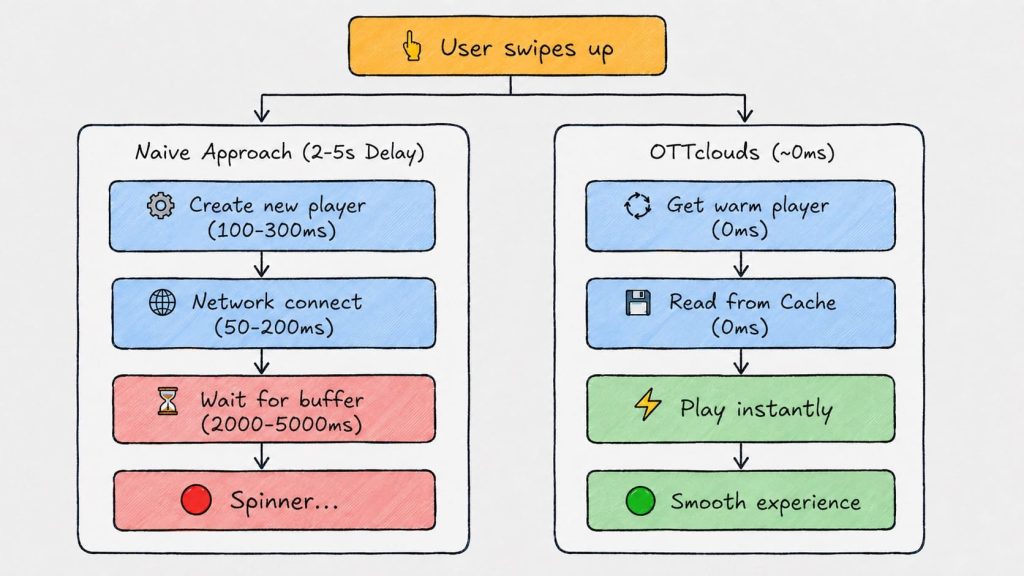
A long-form OTT session, such as a movie, a live match, or an episode, tolerates a couple of seconds of loading. The user has already committed to watching for 40 minutes, so a spinner at the start barely registers. A short-video feed doesn’t get that grace period.
Four structural differences drive this:
Apps like TikTok, YouTube Shorts, and Instagram Reels have trained users to expect zero-latency transitions. If a platform can’t match that bar, users don’t complain; they just leave. OTTclouds built its Android short-video player around this reality, treating startup latency as the primary metric to defeat rather than a secondary polish item.
Every video that starts playing on a phone travels through the same six-stage pipeline. Startup time is the sum of however long each stage takes, and every optimization in this guide works by shortening or skipping one of them.
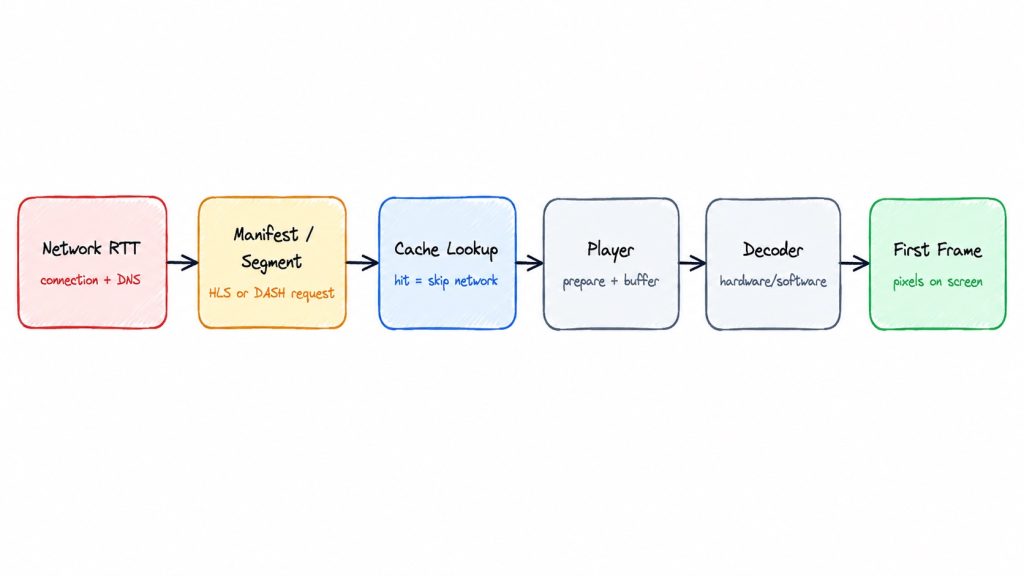
Total time-to-first-frame (TTFF) is the sum across all six stages. A naive implementation pays the full cost of every stage on every swipe. OTTclouds’ techniques collapse stages 1, 3, and 4 to near-zero before the user ever swipes.
The system has four cooperating components: a Feed Controller that tracks swipe position, a Preload Manager that fetches upcoming videos in the background, a shared disk cache that both the preload and the live player read from, and a Player Pool of pre-initialized players.
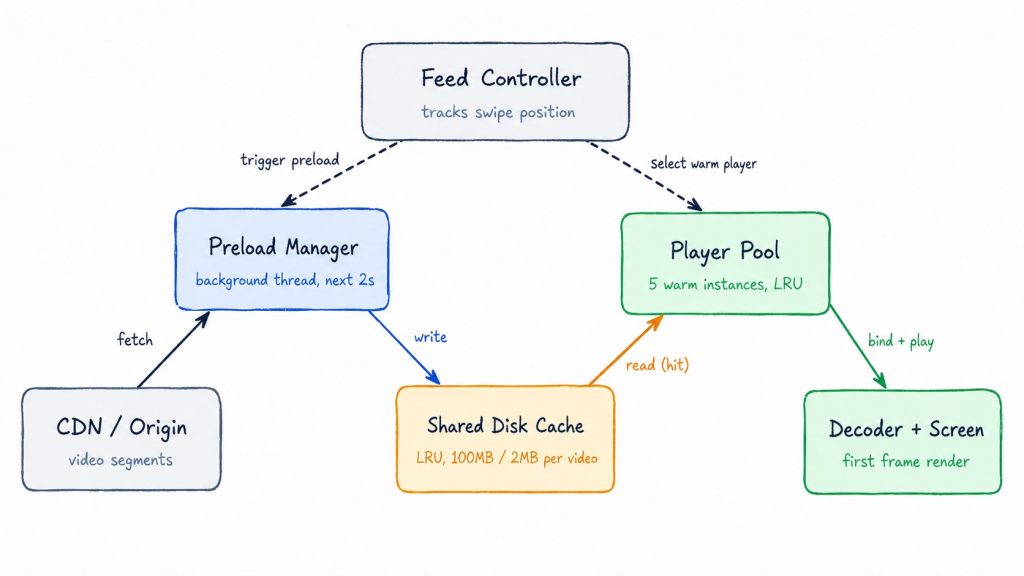
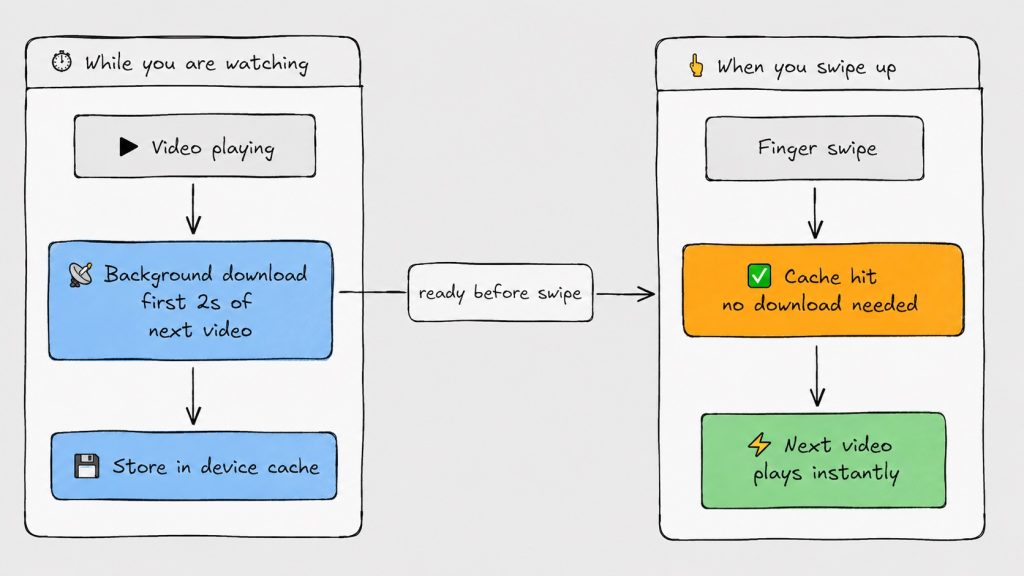
While the current video plays, the Feed Controller triggers the Preload Manager to download the first couple of seconds of the next one or two videos and write them into the shared cache. In parallel, the Player Pool keeps five player instances warm and ready. When the user swipes, the controller doesn’t create anything or start a new download. It matches an already-warm player to already-cached data, then plays. Every technique in this guide is a refinement of one of these four components.
Before tuning anything, instrument the pipeline, optimizing without a baseline means you can’t tell whether a change actually helped or just moved the bottleneck somewhere else.
| Metric | What it tells you |
|---|---|
| Time-to-first-frame (TTFF) | Total time from swipe to a visible frame, the top-level metric |
| Playback start time | Time from the prepare() call to actual play state |
| Rebuffer ratio | Share of sessions that stall after starting |
| Cache hit rate | Share of segment requests served from disk instead of network |
| Bandwidth per video | MB downloaded per video watched, which catches over-preloading |
| Memory footprint | RAM used by the player pool and cache, especially on low-RAM devices |
| Dropped frames | Frames the decoder produced but the UI thread failed to render in time |
Track these at P50/P75/P95, not just the average. A mean TTFF of 400ms can hide a P95 of 3 seconds on weak networks, exactly the tail that drives churn.
What it is: Instead of creating a new player every time the user swipes, OTTclouds maintains a pool of five pre-initialized player instances, each fully ready to accept a URL and start decoding.
Why it works: Creating a player from scratch on Android means allocating hardware decoder resources, initializing an audio session, and building a rendering pipeline, adding 100–300ms of work before a single byte of video downloads. A warm pool drops that cost to zero for every swipe.
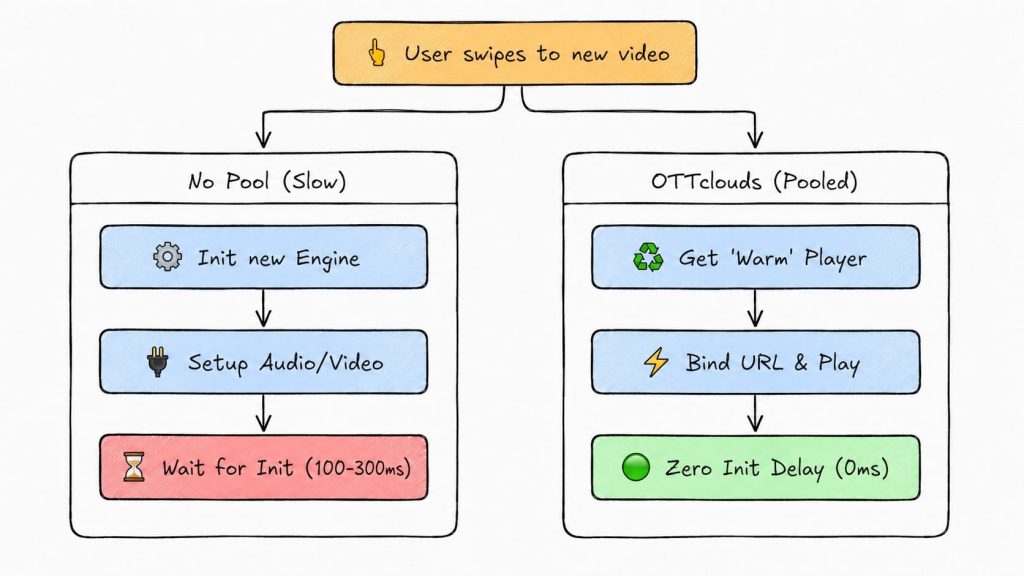
Five covers the current video plus two ahead and two behind, covering the range a user typically moves through in one scrolling burst, including scrolling back. Fewer than five means fast scrollers regularly hit a cold player; more than five buys diminishing returns against a real cost in memory and decoder contention.
Android devices expose a limited number of hardware decoder slots, typically 4–8 depending on chipset, shared across the whole system, not just one app. Holding five players active can consume most of them. OTTclouds falls back to software decoding when hardware slots run out, trading some CPU and battery for a player that doesn’t crash.
Pool size isn’t fixed. On a 1–2GB RAM budget phone, five warm players is a meaningful chunk of available memory, so OTTclouds scales the pool down on low-memory devices and up on flagships and Android TV / Fire TV, where memory is less constrained.
Media3’s PreloadManager API (1.4+) offers a lighter alternative: a single player paired with lightweight PreloadMediaSource instances that pre-buffer data without holding a full decoder. It uses less memory and fewer decoder slots, at the cost of some player-attach overhead on each swipe. This overhead is smaller than full initialization, but not zero. OTTclouds keeps the pooled-player approach where scroll velocity is high, and decoder headroom exists, and defaults to PreloadManager on memory-constrained devices where five concurrent decoder claims aren’t justified.
What it is. The moment a user settles on a video, OTTclouds starts downloading the first two seconds of the videos immediately ahead of and behind it, two in each direction, matching the size of the player pool.
Why it works. Two seconds of buffered data is enough to start playback cleanly. Fetching it before the swipe happens means the transition to the next video costs zero network round-trips.
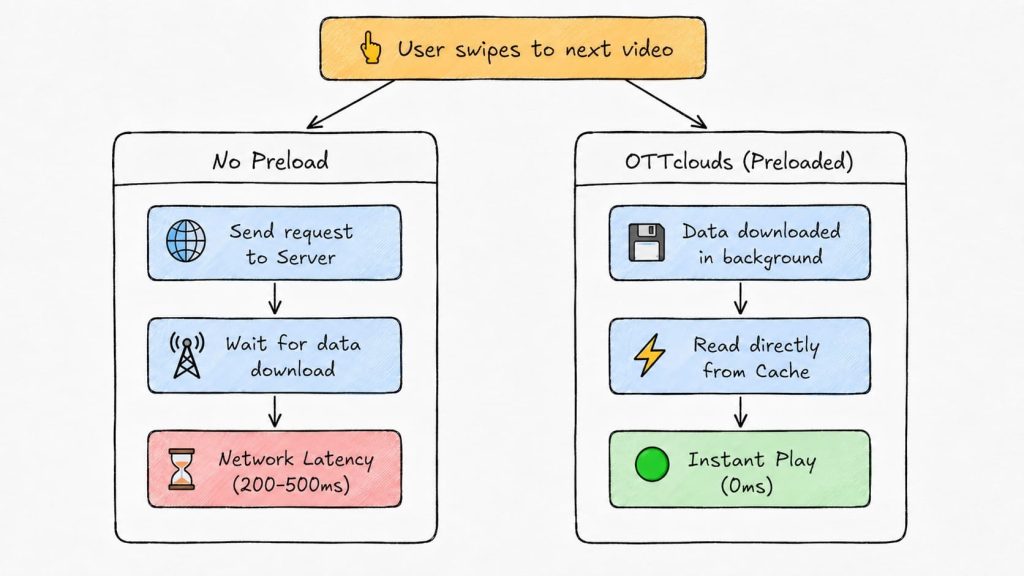
In current Media3 terminology, this maps onto PreloadMediaSource and the TargetPreloadStatusControl API, which lets you define, per position in the feed, how far a piece of media should be preloaded, whether manifest only, first segment, or fully buffered, without attaching it to a Player yet.
The preload runs on a background thread and writes into the same on-disk cache the live player reads from, with no duplicate storage or extra lookup step. If the user scrolls past a video before its preload finishes, the operation is cancelled immediately rather than left to complete and waste bandwidth.
Trade-off. Preloading videos the user may never watch costs real bandwidth, a meaningful concern in markets where cellular data is expensive. OTTclouds caps preload at 2MB per video and narrows the window on metered connections.
What it is. Every downloaded segment fetched by either the live player or the preloader is written to a persistent on-disk cache shared between both. When a segment is requested, the player checks the cache before the network.
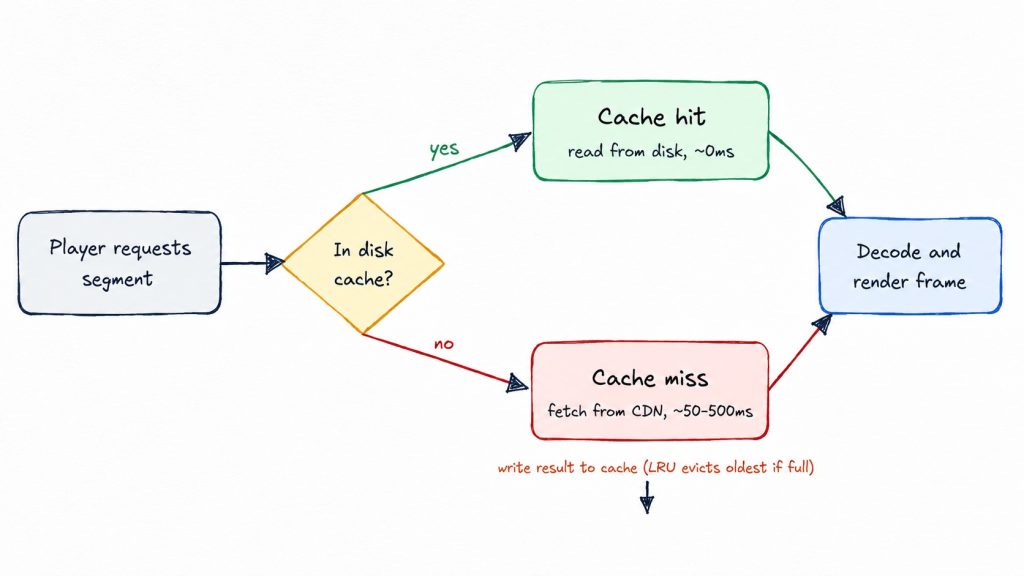
Why it works. Android’s media framework provides a layered caching system: the cache sits between the player and the network, transparently serving repeat requests without application-level bookkeeping. Users re-watch clips and scroll back through a feed constantly. Without a shared cache, every direction change re-triggers a full network fetch.
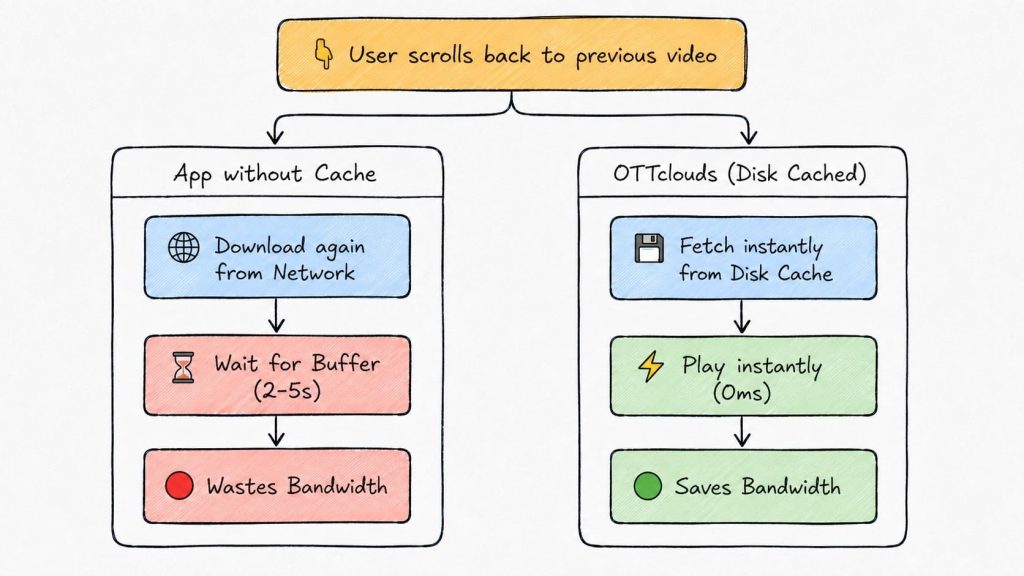
On a hit, the segment is read directly from disk, effectively 0ms with no network activity. On a miss, the player falls through to a normal CDN fetch (50–500ms depending on network conditions) and writes the result back into the cache for next time.
OTTclouds runs the cache with LRU eviction, a 100MB total budget, and a 2MB-per-video cap so no single video crowds out the rest of the feed. A cleanup pass also strips cached playlist files, which are numerous but cheap to re-fetch, to keep the space budget focused on actual video data.
Trade-off. 100MB is non-trivial on a device with 16–32GB of total storage, so the per-video cap matters more on budget hardware. If the cache becomes corrupted, usually because of an app crash mid-write, the player falls back to network rather than failing the request.
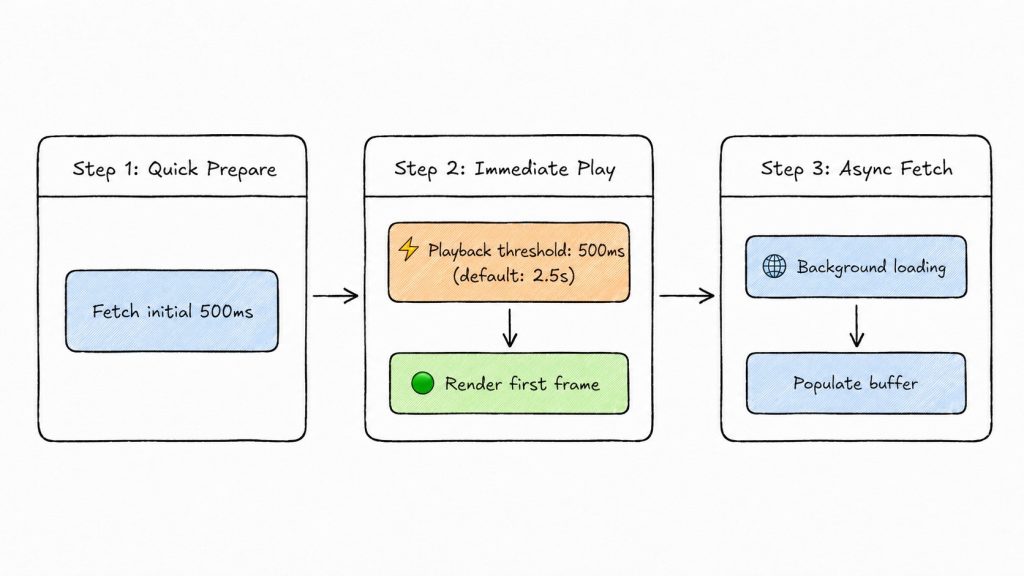
What it is. Standard video players wait for 2–5 seconds of buffered data before starting playback. This is a sensible default for long-form content, where a couple of seconds up front is invisible against a 40-minute runtime. OTTclouds drops that threshold to 500 milliseconds for short-form content.
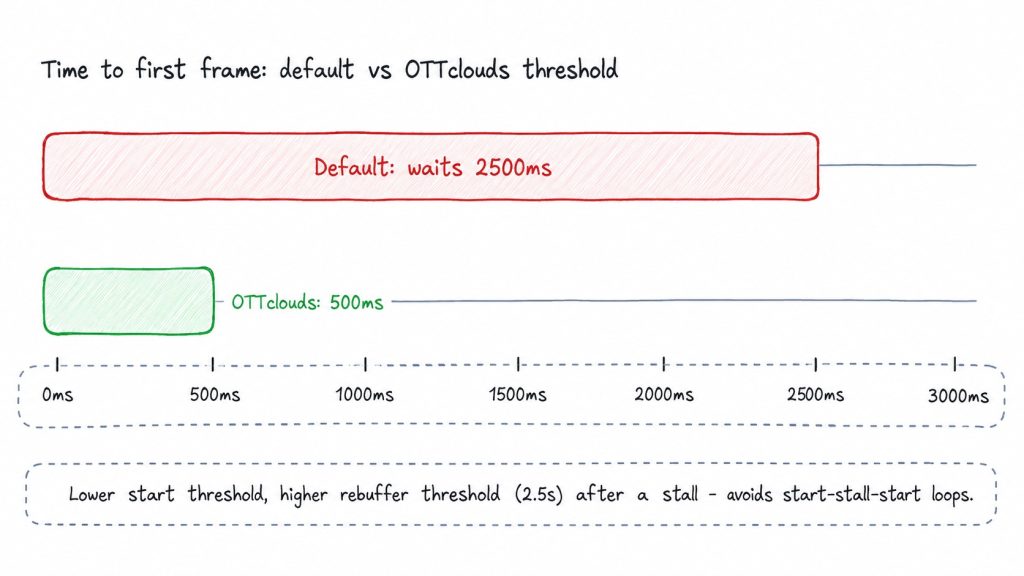
Why it works. Android’s media framework exposes buffer thresholds as direct, millisecond-level configuration: how much data to wait for before starting, how much to keep buffered, and how the player recovers after a stall.
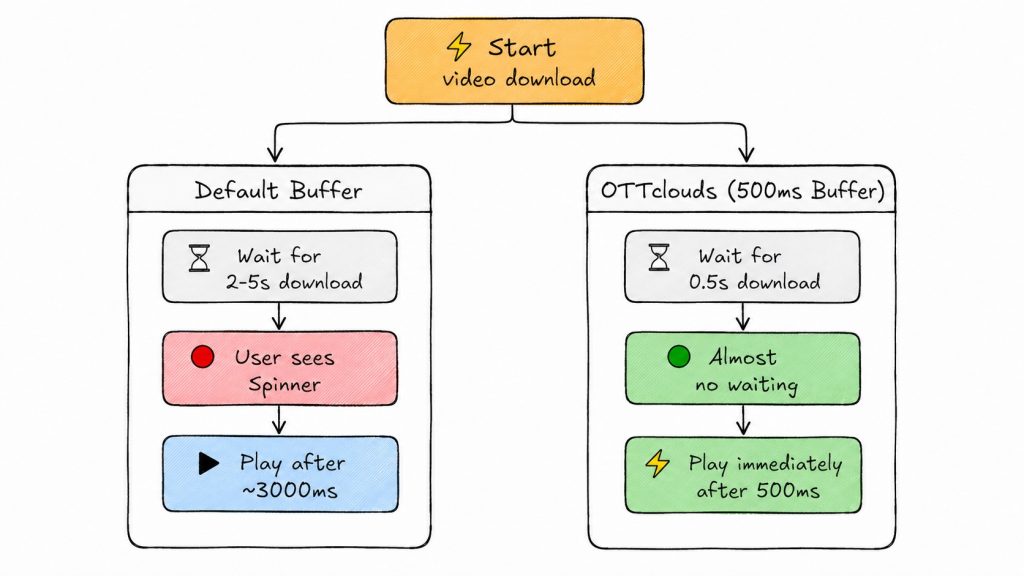
| Parameter | Value | Purpose |
|---|---|---|
| Minimum buffer | 3 seconds | Smallest buffer the player tries to maintain during steady playback |
| Maximum buffer | 8 seconds | Stop downloading beyond this point to save bandwidth |
| Playback start threshold | 500ms | Start playing once this much data is buffered |
| Rebuffer threshold | 2.5 seconds | After a stall, require more buffer before resuming |
| Back buffer | 10 seconds | Data retained for backward seeking |
The player also prioritizes time-based thresholds over size-based ones, optimizing for “can I play?” rather than “do I have enough megabytes?”, which matters more on variable-bitrate content.
Starting playback after only 500ms usually means starting at a lower rung of the bitrate ladder, since the ABR algorithm hasn’t yet measured real throughput. As the player confirms available bandwidth over the next second or two, it ramps up, which can produce a visible quality jump mid-clip. For 15–60 second clips, this trade is generally worth it: a viewer notices a slightly soft first second far less than a 2.5-second black screen. For longer short-form content (60–90 seconds), a slightly higher starting threshold can reduce how visible that ramp is.
Trade-off. Starting at 500ms means a network hiccup shortly after start can cause a stall. The higher 2.5-second rebuffer threshold compensates by making the player wait longer before resuming, which prevents rapid start-stop-start cycles rather than eliminating stalls outright.
None of the four techniques above use fixed settings in production. Each is tuned against the conditions of the specific device and network it’s running on.
On Wi-Fi, OTTclouds preloads aggressively, with both adjacent videos using full 2-second windows. On cellular or any connection Android reports as metered, the preload window narrows to just the immediately adjacent video, and preload amount drops toward the 500ms minimum needed to start.
Player pool size and cache budget both scale with device class. A flagship phone or Android TV box gets a larger pool and more decoder headroom; a 1–2GB RAM budget phone gets a smaller pool, prioritizing stability over maximum preload depth.
A user who swipes every 1–2 seconds gives the preloader almost no lead time, so the system biases toward wider preload windows and faster player recycling for these sessions. A user who lingers on a video for 20+ seconds gets a narrower, cheaper preload footprint since there’s no urgency.
When Android signals memory pressure (via onTrimMemory or similar system callbacks), OTTclouds shrinks the pool on the fly, releasing the least recently used players first, using the same LRU logic as normal recycling, just triggered early.
Player-side optimization only goes so far. A lot of startup latency is decided upstream, in how the content itself is packaged and delivered.
Numbers only mean something next to the conditions that produced them. Here’s a representative before/after comparison from OTTclouds’ internal Android benchmarking, run against the same content library and CDN.
| Stage | Naive implementation | OTTclouds |
|---|---|---|
| Player initialization | 100–300ms | 0ms (pooled) |
| Network round-trip | 50–200ms | 0ms (preloaded) |
| Buffer to threshold | 2,000–5,000ms | 0ms (pre-cached, 500ms threshold) |
| Total perceived latency | 2,150–5,500ms | ~0ms warm cache / ~500ms cold cache |
| Metric | Naive | OTTclouds |
|---|---|---|
| TTFF – P50 | ~2,400ms | ~120ms |
| TTFF – P75 | ~3,600ms | ~350ms |
| TTFF – P95 | ~5,200ms | ~900ms (cold-cache tail) |
The P95 gap matters as much as the median. It’s the tail that shows up as visible stutter on the weakest devices and networks in a brand’s actual audience, not the average case.
| Failure mode | Cause | Mitigation |
|---|---|---|
| Bandwidth waste | Preloading videos the user never watches | Cap preload at 2MB/video; narrow window on metered connections |
| Out-of-memory (OOM) | Player pool and cache size not scaled to device RAM | Scale pool and cache by device class; respond to onTrimMemory |
| Decoder exhaustion | 4–8 hardware decoder slots consumed by 5 concurrent players | Software decoder fallback instead of a crash |
| Rebuffering | 500ms start threshold leaves little margin for network hiccups | Higher rebuffer threshold (2.5s) after a stall to prevent loops |
| Cache corruption | App crash mid-write to disk cache | Fall back to network on a corrupted read rather than failing |
| Aggressive preloading | Wide preload windows on weak or metered networks | Network-aware preload sizing (Section 9) |
None of these are solved by removing the technique that causes them; pooling, preloading, and aggressive buffering are still net wins. They’re solved by tuning each technique’s aggressiveness to the device and network in front of it, and by building a fallback path for every failure mode instead of assuming the happy path holds.
Lower the initial bitrate rung so the ABR algorithm has a genuinely low-bandwidth option, narrow the preload window to reduce wasted downloads, keep the playback start threshold low (around 500ms) so the player commits to playing with whatever data it has, and raise the rebuffer threshold after a stall to avoid repeated start-stop cycles on unstable connections.
OTTclouds builds white-label OTT streaming platforms that handle problems like player performance, multi-platform delivery, content protection, and architecture at scale, so brands can focus on their content and their audience. The short-video playback in OTT techniques described here are part of the OTTclouds Android SDK and support the same kind of experience used in white-label vertical short-video apps.
Short video playback in OTT refers to serving 15–90 second clips in a swipeable, feed-style interface inside an OTT app. The consumer reference points are TikTok, Reels, and Shorts. It’s distinguished from long-form playback by how often playback starts and stops: a single session can involve dozens of “joins,” so startup latency becomes the dominant performance concern rather than steady-state streaming quality.
They don’t actually start instantly because no network delivers video with zero latency. The illusion comes from preparation done before the user acts: the next video’s data is downloaded, and a player is kept ready in the background while the current video plays, so by the time the user swipes, both the data and the player already exist.
It depends on device constraints. A pool of multiple pre-initialized players (OTTclouds uses five) eliminates per-swipe initialization cost, but consumes more memory and hardware decoder slots. A single player combined with Media3’s PreloadManager API is lighter on resources. It pre-buffers data without holding a full decoder per position, but this comes at the cost of some attach overhead per swipe. Memory-constrained devices generally favor single-player-plus-PreloadManager; high-end devices with scroll-heavy usage benefit more from a full player pool.
Roughly the first two seconds of each adjacent video is enough to start playback cleanly without excessive bandwidth waste. OTTclouds preloads the two videos ahead and two behind the current position, capped at 2MB per video, and narrows this on metered or cellular connections.
There’s no single universal number, but for short-form feeds, sub-500ms on warm cache and under one second on cold cache (first view, no preload) are reasonable production targets. Measure at P95, not just average, because the tail is what users on weak networks or low-end devices actually experience.
Yes, substantially. A cache hit serves a segment from disk in effectively 0ms with no network activity, versus 50–500ms for a network fetch. Caching matters most for repeat views and backward scrolling, both common in short-video feeds.
PreloadManager (Media3 1.4+) lets an app define, per position in a feed, how far a piece of media should be pre-buffered, whether manifest only, first segment, or a specific duration, without attaching it to a live Player instance. A TargetPreloadStatusControl implementation returns the desired preload status for each ranked position, and the manager handles fetching and holding that data until the position is actually played.


 Link copied!


 Tuan Tran
 Phuc Cao H. Phuc Cao H. Tuan Tran Phuc Cao H. Phuc Cao H.
